Opinions expressed on this blog are my own and do not represent any other organization or affiliation I may have.
Showing posts with label interactive. Show all posts

Tuesday, 3 June 2014

Foldable Writing Projects

INTERACTIVE READING NOTEBOOKS INFORMATIONAL TEXT: NONFICTION FOR COMMON CORE 4-8 - TeachersPayTeachers.com

This is from pinterest and links to a teachers pay teachers site where you can purchase the book, but I just liked the photo as it shows some cool foldable writing assignments.

I have done foldables assignments with the Canada Food Guide in Home Ec this year with grade 6/7s, as well as with flour mixtures for my Grade 8s. They made pyramids, cubes, all with foldable parts to give details about different topics. Love it!


Source

Saturday, 12 October 2013

Student-Centered Discussion Tips


It can be scary to let students guide discussion in the classroom, but the rewards are well worth it. Check out six tips for implementing student-centered discussion: http://bit.ly/19TdOht

  1. Start With a Challenging Text 
    In the Shared Inquiry method of discussion, the text provides the foundation for student understanding, multiple meanings, and debate. Both Damm and Benefiel found that when preparing for discussion, students were able to grapple with a text much more difficult than that they may have read on their own. “Sometimes I think a text is too hard,” says Damm, “and it has been proven to me over and over that it is not.”

    Take Away: Even if you think a text is above your students’ reading level, bring it in and plan opportunities for students to engage and grapple with it.
  2. Set the Stage 
    Before any discussion, Damm’s students spend five to ten minutes writing their response to the first question. This allows less outgoing students to share their carefully considered answers, and ensures that everyone has an opportunity to participate. After the discussion, students reconsider their answers based on what they’ve heard from other students, and are given a chance to change their initial responses. Damm reads the final responses to assess how students changed their minds during the discussion, and why.

    Take Away: Create and reinforce a structure for preparation, discussion, and reflection. During discussion, set a procedure to help you facilitate and monitor. Damm and Benefiel both recommend keeping a record of who has contributed to the conversation so you can ensure 100% participation.
  3. Seize Questions As Opportunities 
    Students at Sarah Smith Elementary School in Atlanta, GA, start learning Shared Inquiry discussion practices in kindergarten. By first grade, they’re starting to drive the conversation. “Once the students understand how to question, [the rest] comes naturally to them,” says principal Sidney Baker.

    When teachers seize on student questions and use them to drive discussion, it empowers students, agrees Denise Ahlquist, the vice president for training at Great Books. Underscoring the value of questions also helps open the floor to students who may struggle with reading in general.

    Take Away: Set the expectation that questions are valuable and take time to answer every question that you can during discussion.
  4. teens-studying-outside
  5. Encourage Interaction
    Damm and Benefiel sit outside of the discussion circle and interject only to facilitate or to invite students to participate. During discussion, asking students “why?” and “what do you think?” is enough to encourage students to deepen their understanding of the text without losing student ownership.

    Take Away: During discussion, give students simple directions to encourage them to interact with one another. If one student disagrees with another, for example, prompt her to turn to the other student and try to convince him of her point of view.
  6. Seek Support From Colleagues
    At Sarah Smith Elementary, a week before student discussions teachers have their own Shared Inquiry discussions about the stories they are reading in class. This helps teachers go through the process and become deeply familiar with the texts before they facilitate student discussions. It also provides a foundation for later reflection on classroom discussions.

    Take Away: You will find more success with student-centered discussions if you are able to prepare for them in collaboration with other teachers.
  7. Be Patient 
    How quickly or how effectively you will transition to student-centered discussions depends on your own experience as a learner and teacher, so be patient and plan to spend a few weeks teaching students how they work. “It really takes practice to support ideas with evidence and look for deeper meaning,” says Rachel Claff, editorial director of K-12 programs at the Great Books Foundation, but “it yields rich results.”


Four More Tips
Here are four more things to keep in mind when getting started with student-led discussion.

Welcome All Discussion
Talking about text does not just happen in a formal discussion, but throughout the week. Set up pair-shares, informal discussions, and other opportunities for talk as students work with a text. 

Resist the Urge to Explain
Your first instinct might be to explain the text, especially if students are stuck. But resist that urge and trust the process of discussion to get kids to form their own understandings and build off of each other’s ideas.

Model Curiosity
During Shared Inquiry, the role of the teacher is to be a model learner for students and to show what it means to go from not understanding to creating meaning. 

Take Risks
As you ask your students to take risks, be willing to be pushed out of your comfort zone as well. If a student asks you for more reading from a challenging author, run with it!


Thursday, 28 March 2013

Tech Tool: Visualead: Colourful QR Code Generator

Cool Tools has another awesome blog post for us. I would love to use these in my class, I noticed the new Socials Studies text books we got have them inside and the kids have used them to scan and learn more about history.

Visualead: Colorful QR Code Generator


Visualead is a free and user friendly tool for generating colorful QR codes in three simple steps.

1.  Uppload an image.
2.  Drag the slider over the image.
3.  Click lick a button to generate the embed code.

Visualead is integrated with many popular social networking tools which allows you to create a QR code to suit your needs.


Here is an example of a QR code created with the free version of Visualead. This was designed to help training participants quickly jump to my Digital Differentiation interactive page.


Digital Differentiation generate qr code


Uses in the Classroom

Here are some excellent sources of  ideas for using QR codes  in the classroom from some amazing educators.. 

Try Visualead

Scroll over this interactive image to try Visualead for yourself.

Monday, 25 March 2013

Cool apps for note taking


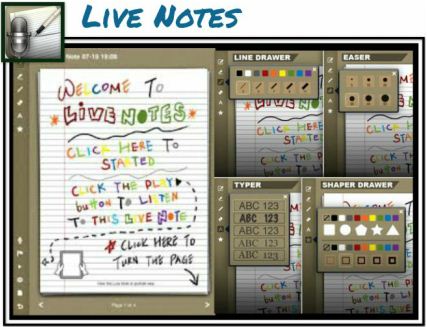
Live Notes

Live Notes is a colorful note-taking and sketching app that allows for simultaneous audio recording. Draw shapes and doodles during a lecture or meeting. Type text and choose from a variety of fonts and bright colors. Tap parts of a sketch to hear the audio that was recorded at the specific point in time when the sketch was drawn. 

Live Notes is a paid app, but you can try Live Notes Lite for free. 


Note Anytime

Note Anytime is an app for taking notes, sketching, and annotating PDFs. Caligraphy tools support improved letter formation providing assistance with sloppy iPad penmanship.  Use the app to easily import and markup PDFs. Export notes to popular social media sharing sites, like Twitter, Facebook and Drop Box. 

Note Anytime is currently a free app available in iTunes.


ScratchWorks

ScratchWorks is a note-taking app that allows users to take notes on one side of the screen and browse the web on the other. Type text notes or insert a sketch area into the notes for doodling. It also provides a custom math keyboard. 

ScratchWorks is a free app, available in iTunes.


Source:  Cool Tools for 21st Century Learners