VIA: http://www.myenglishteacher.eu/blog/26-educational-technologies-every-teacher-and-student-should-know/
Tuesday, 1 October 2013
TECH TUESDAY: Edteach Cheat Sheet
VIA: http://www.myenglishteacher.eu/blog/26-educational-technologies-every-teacher-and-student-should-know/
Tuesday, 24 September 2013
Tech Tuesday: KidBlog, Augmented Reality, CargoBot and more

KidBlog allows your students to set up their own blogs.
It allows students to create their own positive digital footprint. Kidblog allows students to embed video, slideshows, artwork, etc. As the teacher, you have control of all the privacy settings for your class. It also creates an excellent digital portfolio of of each students writing.

Cargo-bot is a great iPad app to get students introduced to basic coding skills. It sponsored by code.org, which is a non-porfit foundation dedication to growing computer programming education. It is the first app ever created solely on an iPad using the app Codea.
It features 36 fiendishly clever puzzles, haunting music and stunning retina graphics. You can even record your solutions and share them on YouTube to show your friends. (http://twolivesleft.com/CargoBot/)
I encourage you to check out the original post which lists these and more cool tech tools to use in your class. They also explain each one and give links to reviews and to download or sign-up.
Source: http://www.twoguysandsomeipads.com/2013/08/5-free-tech-tools-for-this-school-year.html
Tuesday, 17 September 2013
Tech Tuesday:App Smashing
Definition of App Smashing: "The process of using multiple apps in conjunction with one another to complete a final task or project."
Source: Read more about app smashing here!
I have to wrap my head around this and actually give it a try.... but it is something I wanted to post to see if there was anyone familiar with this who could share their process and results??
Tuesday, 10 September 2013
Tech Tuesday: Remind 101
What I like about this post from http://www.twoguysandsomeipads.com is the screen shots and descriptions from the program....
Remind 101 is an tool that allows you to text your students or stay in touch with parents in a secure and safe way. Teachers never see student or parent phone numbers, and they will never see the teacher's phone number. Educators can send messages using the mobile app on Android and iOS devices, as well as www.remind101.com.
This tool is great for friendly reminders about field trips, homework, plays, events, or a kind motivational message. Remind 101 has recently redesigned their iOS app with great new features and a teacher resource page to help with any questions.

iOS
Android
This is def. something I want to try using.....
Tuesday, 3 September 2013
Tech Tuesday: Three Ring

Three Ring is an app that completely changed the way I create student portfolios and communicate with parents. Three Ring allows you to capture and share each learning moment in a photo, video, audio recording, or written note in a secure fashion. Each parent can only view the material of their child in the blog style format. It gives the parents a feeling of being in the classroom without actually being there or "feel like a fly on the wall in my child's classroom."
Check out their review on Teachers with Apps here and blog post.
Download Three Ring
Set up an account on their site here
See more at Source: http://www.twoguysandsomeipads.com/2013/08/5-free-tech-tools-for-this-school-year.html#sthash.4q1sPOqW.dpuf
Wednesday, 26 June 2013
Sign Up Genius
A neat way to organize volunteers, schedules, etc. A great way to set up parent teacher interviews, class volunteers and jobs, donations, parties, fundraisers and pretty much anything!
Tuesday, 25 June 2013
Bringing Novel Study Into the Computer Lab
I highly reccommend reading:
Bringing Novel Study Into the Computer Lab http://glendastewart-smith.blogspot.com/2010/07/bringing-novel-study-into-computer-lab.html
It explores the use of computer labs and class sets of laptops, Inquiry Based learning, PBL, collaborative learning and of course technology. The focus on literacy, diverse learners and how to bring it all together.
Here are some excerpts:
The creation of heterogeneous groupings is an important component to the success of this project. A good reader may support a poor reader, and a student with a more “expert” background in computer skills will provide support for their group during project time in the computer lab. Heterogeneous groupings also provide opportunities to separate students-at-risk from their peers. If, for instance, reception level ESL students always work together, then they are denied the opportunities to learn more advanced grammar and syntax from native-speakers. Support can also be provided for struggling readers through the use of audio books on CD and tape. Everyone “reads” the story and everyone can contribute to the web site projects.
In longitudinal studies that looked at the impact of learning from computers (using them as tutors or as part of integrated information systems), and learning with computers (using them as a reading and writing tool during collaborative learning situations), researchers found that in all cases student achievement was positively impacted. (Barnett. 2003) In the first scenario, students’ gains could be measured in increased scores in statewide tests and increased discipline, and all evidence indicates that this benefit continues in higher grades. Students learning with computers made significant gains in other areas:
1. Students routinely used higher-order thinking skills far beyond what was expected for their grade level.
2. Students demonstrated enhanced ability to collaborate with peers to develop projects and reports.
3. Students demonstrated increased initiative. They maintained time on task for longer periods and often continued their work during recess, before school, and after school. (Barnett. 2003)
.....
Another question centers on acceptance of this learning context as valuable. Certainly it is not traditional. Society is on the verge of a paradigm shift and electronic technology will revolutionize learning to the same extent as the printing press did in the 1500s. Computer literacy will certainly begin to become almost as important as language literacy. Will oral literacy be enough? Can voice recognition software and a fast computer replace the need for reading and writing competency? Will educators consider computers valuable or is it just an expensive and under used toy? Hopefully the use of project-based and collaborative learning in the computer lab will help answer these questions and promote students’ literacy learning and critical thinking.
Monday, 24 June 2013
Remind 101
A safe way for teachers to text message students and stay in touch with parents. FREE!
https://www.remind101.com/
Wednesday, 19 June 2013
QR code fun
This week was also fun because the students got to use their devices, and QR codes to do a warm up using SMART XC (extreme collaboration). The kids scanned the green QR code, answered the question, then scanned the black QR code, which connected them to the SMARTboard, and they typed in their answer. Their answer then shows up on the board somewhere and after we have a bunch we can see which one is correct! And what's great is I can choose for the information to be anonymous so no kid has to worry about being made fun of if their answer is wrong. Thanks to @RafranzDavis for showing me this!

I've posted about QR codes before here: http://alonganderson.blogspot.ca/2013/03/tech-tool-visualead-colourful-qr-code.html
Tuesday, 18 June 2013
Ipads in the classroom
There are many reasons to use iPads in the classroom - besides the fact that they are super cool. Studies have shown that using iPads can increase student engagement and test scores. These studies also show that there are both three approaches to integration - teacher to student, student to student and student groupwork - and three types of apps - interactive, reference and productivity/creativity.
- Interactive apps require user engagement, but do not create new materials. Examples: Angry Birds, Hotel Tycoon, GraphingCalcHD, MayanMath
- Reference apps provide a wealth of information - just like the reference section of a library. Examples: Bible, NutritionFacts
- Productivity/Creativity apps allow users to create or produce something. Examples: Keynote, Pages, Numbers, drawing and painting apps, music creation, movie editing
Saturday, 15 June 2013
Wednesday, 12 June 2013
Apps Parents Can Use to Promote 21st Century Literacy
Saturday, 8 June 2013
Technology is being used in a number of educational ways....
This week one student came up to me to explain that while reading Tlinglit legends (as part of a project she has chosen to take on in conjunction with our novel study 'Touching Spirit Bear') she couldn't "get" the moral of one of them... another student piped in "ya it makes no sense, there is really no lesson" (he is NOT doing this project, but somehow knew what she was talking to)
Puzzled, I ask which legend and he pulls up the legend summary the first student had wrote, which he had in a skype chat and showed me the legend.
I noticed as I was reading that 6 students in class were part of the chat and had been collaborating and discussing as they worked through their final projects (which were all different projects, very diverse as they were able to choose from list or create their own final projects)
How cool!
Did You Know?
- 1/4 of teens own a smartphone. 77% have a ‘cell phone’, more generically speaking
- 63% of students prefer a blended learning environment
- Virtual labs are allowing science experiments to happen across the country
- 95% of teens aged 12-17 use the internet regularly
- 1:1 device programs are allowing learning at school and at home
- Only 23% of internet users and 7% of cell phone users say that they’ve taken part in a video call, chat, or teleconference
Source: http://www.edudemic.com/2013/06/types-of-connected-students/
Thursday, 6 June 2013
5 Apps that engage parents
One that I didn't know about was 'Fast Follow' on twitter:
Twitter: Whether it is class homework updates, project deadlines, school news or dinnertime conversation starters, teachers are taking advantage of Twitter’s free tool and keeping parents up to date and involved in classroom happenings. In a day-in-age where most parents have cell phones, Fast Follow by Twitter becomes a simple and reliable alert system. To use it, all you need to do is setup a Twitter account and ask parents (and older students) to text Twitter’s shortcode of 40404 with the message “follow [your Twitter username].” From there, parents will start receiving all of your updates via text message in real-time.
Read more here: http://www.weareteachers.com/community/blogs/weareteachersblog/blog-wat/2013/05/30/5-apps-that-engage-parents-in-the-classroom
Friday, 31 May 2013
Student Digital Portfolios for assessment and learning
It is unfortunate that many schools don't have the capabilities to do this (not enough ipads, laptops, computers in classroom, bandwidth, wi-fi, money, etc.) but I do like the idea. I have used forums and such for independent novel studies and interactive class activities in the past, but I would love to use blog portfolio's for students. It would be interesting for them as well to have and be able to look back on.
The post explains:
Verbal explanations
I have always used formative assessment in my classroom, but our digital portfolios give me much richer information than our paper portfolios ever did. Because my young students are still beginning writers, it is often difficult for them to explain their learning through writing. They can, however, explain their learning verbally. There are lots of apps (including my current iPad favorites Educreations and Draw & Tell) that record voice over an image. These digital artifacts allow me to understand a child’s thinking in a much deeper way.
The beauty of digital portfolios is that as the children and I are constantly assessing their learning in a formative and summative way, the students are also demonstrating their growing knowledge for a wide audience and learning about digital citizenship and appropriate online behavior. What great by-products of the assessment process!
Please check out the entire article here: http://plpnetwork.com/2013/05/30/digital-porfolios-thinking-assessment/
Friday, 19 April 2013
Friday, 5 April 2013
50 apps for teachers....
Education—there’s an app for that. In fact, there are hundreds of thousands of apps on the market designed for teaching and learning.
Check out the website for dozens of apps in various subject areas.
Thursday, 28 March 2013
Tech Tool: Visualead: Colourful QR Code Generator
Visualead: Colorful QR Code Generator
Visualead is a free and user friendly tool for generating colorful QR codes in three simple steps.
1. Uppload an image.
2. Drag the slider over the image.
3. Click lick a button to generate the embed code.
Visualead is integrated with many popular social networking tools which allows you to create a QR code to suit your needs.
Here is an example of a QR code created with the free version of Visualead. This was designed to help training participants quickly jump to my Digital Differentiation interactive page.
Uses in the Classroom
Here are some excellent sources of ideas for using QR codes in the classroom from some amazing educators..
- QR Codes in the Classroom, Kathy Schrock's Gude to Everything.
@kathyschrock - 50 Interesting Ways to Use QR Codes in the Classroom, Tom Barrett's collaborative, interactive Google Doc filled with ideas.
@tombarrett - AutoGenerate QR Codes in a Google Spreadsheet, Tammy Worcestor's Tip of the Week.
@tammyworcester
Try Visualead
Wednesday, 27 March 2013
VanSun: In today's digital world, teachers should be best and brightest
It will come as no surprise to anybody who has been paying attention that kids in today's classrooms with their BlackBerrys, iTouches, iPhones, thousands of apps, Google, Wikipedia, Face-book, Twitter and laptop windows on the world are making a new kind of demand on public education and its teachers.
"Digital" has always been in these kids' cultural DNA, they've likely never written in cursive, their cellphones tell them the time and are their social lifelines, they can organize a flash mob in two minutes and anything bizarre that happens in a classroom will be on YouTube later that same evening.
Teaching this group in a classroom is not getting any easier.
Today's kids are awash in a computerized technology that does not distinguish information and knowledge. So it will be up to their teachers to help them distinguish gold from dross.
Read More at Vancouver Sun
Monday, 25 March 2013
Cool apps for note taking
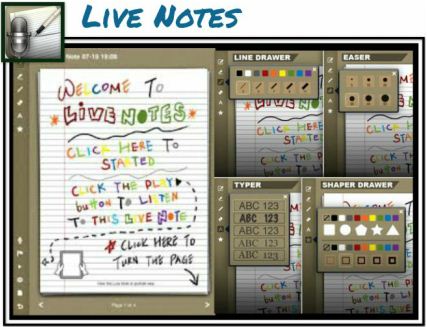
Live Notes
Note Anytime
ScratchWorks
ScratchWorks is a note-taking app that allows users to take notes on one side of the screen and browse the web on the other. Type text notes or insert a sketch area into the notes for doodling. It also provides a custom math keyboard.ScratchWorks is a free app, available in iTunes.
Source: Cool Tools for 21st Century Learners